Claude Code
FullAutomatic capture and recall. The harness supports Context Injection.
Install in one command.
Run one command. Approve in your browser. The installer detects your apps and asks before writing.
One-command install
The installer detects the AI apps on this machine and asks before writing any config.
Terminal command
curl -fsSL https://memorycrystal.ai/crystal | bash
Official platforms
Support Tier badges come from the capability table. A host that cannot inject context cannot show Full.
Automatic capture and recall. The harness supports Context Injection.
Automatic capture and recall. The harness supports Context Injection.
Recall is deliberate, not automatic. The harness ignores hook output on passive events, so it cannot inject context.
Automatic capture and recall. The harness supports Context Injection.
Automatic capture and recall. The harness supports Context Injection.
Install Memory Crystal into the CLIs this host runs. Channel memory is not available.
Buzz pageOther MCP hosts
Claude Desktop, Codex Desktop, OpenCode, Factory Droid stay installable. They are not official platforms. Use the generic MCP path, or pass the host's installer id under Advanced.
curl -fsSL https://memorycrystal.ai/crystal | bash -s -- --targets generic-mcp
Set up Memory Crystal (persistent memory) on this machine, then use it in every session from now on.

STEP 1 - INSTALL
Detect this harness and pass --targets with the matching id: claude-code, claude-desktop, codex-cli, codex-desktop, cursor, opencode, factory-droid, hermes, openclaw, grok, generic-mcp.
macOS / Linux / WSL:  curl -fsSL https://memorycrystal.ai/crystal | bash -s -- --targets <id>
Windows PowerShell:   iwr https://memorycrystal.ai/install.ps1 -OutFile install.ps1; .\install.ps1 -Targets <id>
hermes is bash-only. Follow sign-in and backend prompts. Never hand-edit harness config (MCP, hooks, plugins). If the installer says to reload or restart this app, do that before verifying. Grok is Capture tier: tools and automatic capture, no automatic recall. Passive events ignore stdout, so the harness cannot inject context. Buzz is Hosted: install into the CLI Buzz is running, not into Buzz. Channel memory is not available. Docs: https://docs.memorycrystal.ai/installation

STEP 2 - VERIFY (after any required reload/restart)
Read Support Tier from the installer line "Support Tier: <id> = full|capture|tools". That is the harness tier, not billing. whoami.account.tier is billing (free/pro). whoami email or name is account identity.
Use ~/.memory-crystal/config.json (apiKey, convexUrl, agentId). Hosted default convexUrl: https://convex.memorycrystal.ai. GET {convexUrl}/api/mcp/whoami with Authorization: Bearer <apiKey>.
Assert only layers the installer claimed or wrote. If output says hooks, Managed Block, or instructions.md were skipped (tools-tier, PowerShell, or no agentsFile), skip those layers and do not fail. Capture-tier and skipped-hooks installs must not fail for missing automatic recall.
Report pass/fail per layer, including the whoami email or name:
- credentials: whoami returns email or name. Missing key or 401 = FAIL credentials (name that layer).
- tools: crystal_stats or crystal_status responds.
- hooks/plugin: only if the installer wrote hooks or a plugin. Tools-tier and PowerShell hook skips: skip; do not fail.
- discipline: only if the installer wrote a Managed Block or instructions.md. If skipped, skip; do not fail.
- identity: config.json agentId is non-empty.
- automatic recall: only if Support Tier is full AND hooks were written. Do not assert on capture-tier, tools-tier, or skipped-hooks installs.
If a claimed layer fails, re-run the installer and stop. Do not patch config by hand.

STEP 3 - USE MEMORY CRYSTAL — ASYMMETRIC CONTRACT, EVERY SESSION, NOT OPTIONAL.
- **Recall (read):** call crystal_recall (crystal_what_do_i_know for broad topics) when the task depends on past work, decisions, people, projects, or preferences. Never answer from vague recollection. Skip self-contained requests.
- Need exact past wording, quotes, commands, or code? crystal_search_messages.
- **Remember (write):** after learning any durable fact, decision, preference, lesson, or goal: save it with crystal_remember immediately, without being asked. Correct existing memories with crystal_update; replace outdated ones with crystal_supersede.
- BEFORE config changes, deletions, or external sends: crystal_preflight for the rules and lessons that apply.
- Reference material lives in knowledge bases: crystal_list_knowledge_bases to discover them, crystal_query_knowledge_base with the KB name for targeted lookups.
- Before changing something you did not build: use crystal_why_did_we to recover the recorded rationale.
- At major milestones, or when the user asks for a backup: crystal_checkpoint.
Only skip recall tools for greetings, small talk, or questions fully answered inside the current conversation.Pass a shipped --targets id if you do not want the installer to ask about every detected app.
curl -fsSL https://memorycrystal.ai/crystal | bash -s -- --targets claude-codecurl -fsSL https://memorycrystal.ai/crystal | bash -s -- --targets claude-desktopcurl -fsSL https://memorycrystal.ai/crystal | bash -s -- --targets codex-clicurl -fsSL https://memorycrystal.ai/crystal | bash -s -- --targets codex-desktopcurl -fsSL https://memorycrystal.ai/crystal | bash -s -- --targets cursorcurl -fsSL https://memorycrystal.ai/crystal | bash -s -- --targets factory-droidcurl -fsSL https://memorycrystal.ai/crystal | bash -s -- --targets generic-mcpcurl -fsSL https://memorycrystal.ai/crystal | bash -s -- --targets grokRecall is deliberate, not automatic. The harness ignores hook output on passive events, so it cannot inject context.
curl -fsSL https://memorycrystal.ai/crystal | bash -s -- --targets hermescurl -fsSL https://memorycrystal.ai/crystal | bash -s -- --targets openclawcurl -fsSL https://memorycrystal.ai/crystal | bash -s -- --targets opencode[ WHY MEMORY CRYSTAL ]
Memory Crystal gives your AI agents durable memory across compactions, restarts, and new sessions. Decisions, workflows, and context stay available exactly when your agent needs them.
Knowledge bases • Scoped isolation • Lossless snapshots + trace • Media capture
[ HOW MEMORY CRYSTAL WORKS ]
Memory Crystal handles both the live context your agent needs right now and the persistent memory it should keep forever. It works passively in the background, so context survives compaction, restarts, and switching between tools.
Layer 1
Fast, live memory for the conversation happening right now.
Pipeline
Completed turn → grounded distillation → bounded recall
Layer 2
Durable knowledge that keeps accumulating across sessions, tools, and machines.
Storage
Cloud-synced memory backed by Convex and exposed everywhere through MCP.
Why it feels different
[ MEMORY IN ACTION ]
Real examples across Terminal, Discord, Telegram, Claude Code, and Codex — your agent recalls context no matter where the conversation happens.
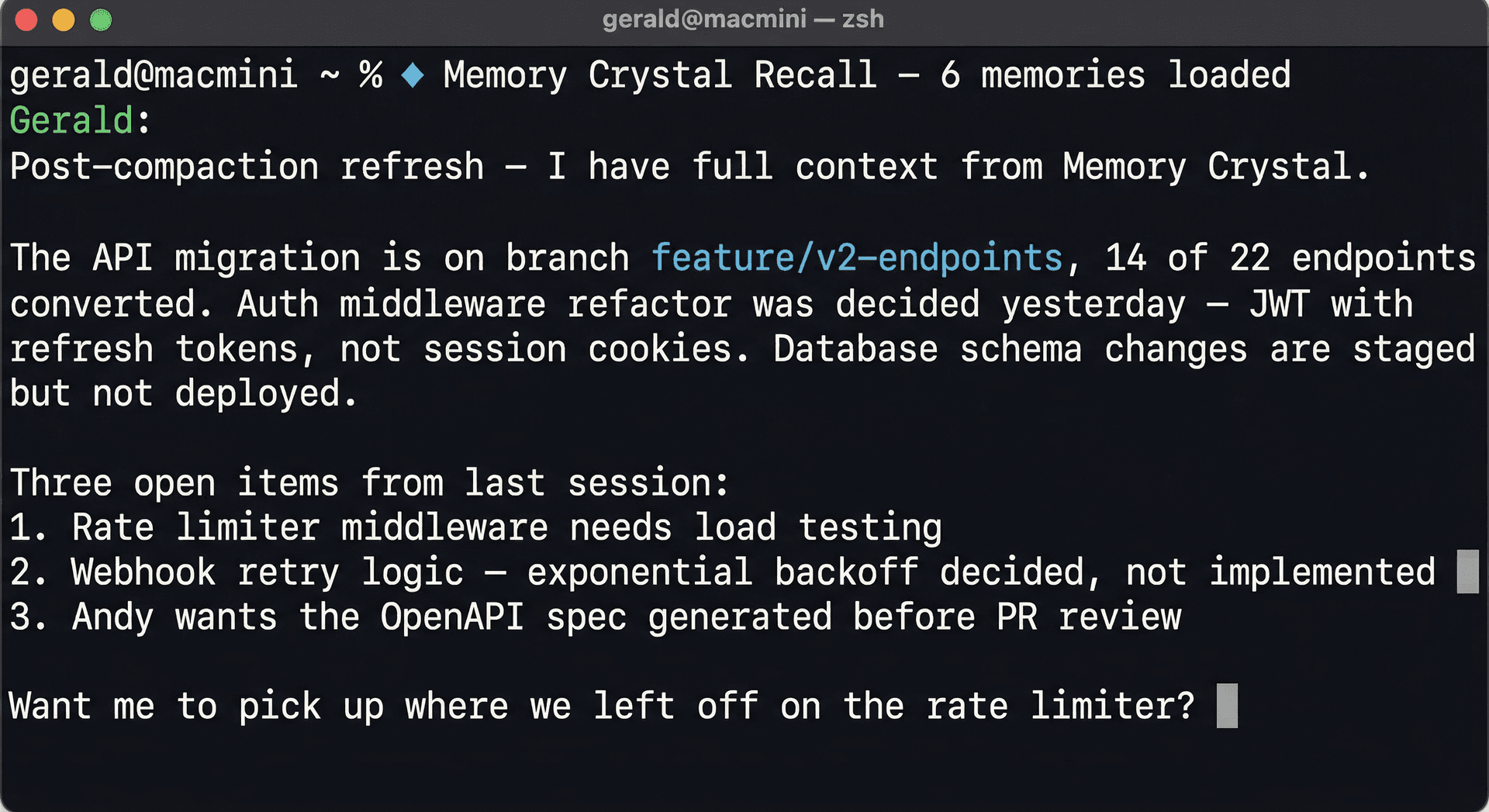
Agent recovers full project context after session compaction — no re-explaining needed.
[ HOW IT WORKS ]
Memory Crystal captures completed turns once, distills durable signal, and returns bounded context through explicit or optionally injected recall.
1. Capture
Your agent completes a conversation turn
2. Distill
High-signal context becomes durable memory
3. Store
Durable cloud storage
4. Recall
Agent requests bounded relevant context
5. Respond
Agent answers with full context
1. Capture
The completed user and assistant turn is persisted once through an idempotent capture path. Retries do not create duplicate transcript rows or extra inference work.
[ EARLY USERS ]
“We integrated Memory Crystal into our AI platform and it changed everything. Before, the AI started every session essentially cold. Now it wakes up knowing each user's active goals, what progress they've made, what patterns keep showing up. Each of our 30+ users gets their own isolated memory store — completely private. The difference isn't incremental. An AI that remembers is a completely different product than one that forgets.”
“I've been building AI agent workflows for my business for a year and the biggest friction was always context loss. Every Monday I'd spend 20 minutes re-orienting my agent on active projects, decisions we'd made, things to avoid. Memory Crystal eliminated that entirely. Now I open a session and it just knows where we are. It's the piece that was missing.”
“What convinced me was the privacy model. Each channel gets its own isolated memory — nothing bleeds between clients, nothing bleeds between contexts. For the kind of sensitive conversations I facilitate, that separation isn't optional. Memory Crystal was the only tool that had it built in from the start, not bolted on. Grateful this exists.”
[ READY TO STOP LOSING CONTEXT? ]
Free plan includes 500 memories, 500 short-term messages kept until you delete them, and 3 channels. Raw sensory memories kept until you delete them.